
If you open a Terraria world and are greeted by walls of chests, this guide is for you. Modern Terraria throws more items at players than ever, and they stack up fast, usually faster than you expect. Weapons, blocks, potions, materials, and modded drops can quickly take over both your base and your patience. That’s why terraria storage ideas and inventory management matter so much for normal play, in my view. As a world grows, storage often ends up being just as important as building or combat, and sometimes even more. Magic Storage changes how the game feels by replacing messy chest rooms with a clean system you can search in seconds, often with a single click. The difference is easy to notice. Time spent digging through boxes fades away, and your attention stays on actually playing. With less clutter, the game flows better, and you usually feel that right away.
This magic storage guide terraria tutorial is for players who want smoother gameplay with less hassle, especially if downtime drives them crazy. Streamers benefit because crafting stays quick during live sessions when chat is moving fast. Competitive players keep their pace without stopping to sort items. Modded players, who often end up buried in loot, can regain control before things get messy. Casual builders benefit too, I think, especially if they want a base that feels calm and usable. The guide walks through everything step by step without rushing. It explains what Magic Storage does, how to set it up, how to expand it, and which common mistakes slow people down.
Along the way, it looks at terraria storage ideas that go beyond pure efficiency, like grouping related items and cutting down on crafting backtracking. These small choices add up over time. Storage affects pacing and focus more than people expect, and a clean magic storage setup terraria style helps long sessions, late-game worlds, and heavy mod packs stay enjoyable. When friction drops, the whole game usually just feels better.
Why Storage Is a Real Problem in Modern Terraria
Terraria didn’t always feel this busy. In earlier versions, item counts were lower, crafting trees were simpler, and most players got by with a few wooden chests (and yes, it often felt pretty cozy). That stage is mostly behind the game now. With more than 6,000 items in current versions, and even more once mods are added, basic chest storage usually falls apart sooner than players expect. What comes next is often a maze of chest walls, color‑coded signs, and lots of running back and forth across a base just to craft one thing. Then another. Then another.
The most obvious issue is time loss. Digging through long rows of chests can quietly eat up minutes, and over longer sessions those minutes add up faster than people think. There’s also mental strain and small mistakes. Remembering where everything is stored pulls attention away from exploration and combat, and it’s easy to miss recipes or forget that certain materials are already sitting somewhere. For many players, that frustration shows up earlier than expected.
Progress slowdown is another part of the problem that doesn’t always get talked about. Crafting trees get deeper as the game goes on, and messy storage directly slows that flow. Progress often stops not because materials are missing, but because they’re spread across biomes, NPC houses, or old chest rooms no one uses anymore. Over dozens of hours, that constant drag can push players toward burnout, especially when returning to older worlds or switching characters (that’s where it usually feels worst).
Magic Storage is built to smooth out those pain points by pulling everything into one central system. One place, one interface, instead of dozens of chests. A built‑in search helps with item names, and crafting pulls ingredients straight from storage, which usually saves more effort than players expect. The biggest change is how everyday tasks feel lighter: finding items, checking recipes, and building upgrades all take fewer steps. That’s why Magic Storage often comes up with other quality‑of‑life mods in discussions about resource‑heavy games, like those covered in Top Survival Games With Advanced Resource Management Systems.
When players compare chest walls to Magic Storage, the difference is usually obvious right away. Guesswork fades.
| Storage Method | Search Speed | Crafting Ease | Scales With Mods |
|---|---|---|---|
| Wooden Chests | Slow | Manual | Poor |
| Labeled Chest Rooms | Medium | Manual | Limited |
| Magic Storage | Instant | Integrated | Excellent |
Magic Storage also grows along with Terraria as more systems and items are added, which helps explain why many players stick with it after trying it once. In most cases, they don’t go back.
What Magic Storage Actually Does Under the Hood
At a basic level, Magic Storage works like a small internal network running inside your world. Every storage unit you place connects back to a single central heart, and that’s where everything passes through. It’s similar to a server rack, just simpler and easier to manage. Items are no longer locked to individual chests. Instead, they live inside the system as neatly organized entries. Because of that change, searching, sorting, and crafting feel smooth instead of annoying. You stop caring about where items physically sit. There’s no chest hopping and no guessing. You type a name, grab what you need, and move on. It’s how storage feels like it should have worked all along.
The system is built from a few clear parts that work together. The Storage Heart acts as the brain. Storage Units handle capacity and let you expand without friction as your collection grows. Crafting Stations pull materials straight from storage, so recipes usually work right away with no extra steps. Access points are how you interact with the system day to day, and they’re what you’ll click most often. Each piece is simple by itself, but together they replace dozens, sometimes hundreds, of scattered chests. In most worlds, the time savings become obvious pretty quickly.
In the background, the mod constantly sorts items by type, stack data, and which mod they come from. That setup allows fast searches and dependable recipe checks. When you open the crafting menu, it looks at every connected crafting station and every stored item, then quietly builds a live list of what you can make. All of this happens without you seeing it. That’s why it feels magical, even though it’s really just smart organization.
Another upside people don’t always expect is consistency. Once you learn one Magic Storage setup, you can rebuild it in almost any world without relearning anything. That’s useful if you switch saves, and it matters for streamers, content creators, and players who enjoy planning ahead. It feels closer to strategy or factory-style games, where systems matter more than random chaos.
On the visual side, Magic Storage also cleans up your base. Giant chest halls aren’t needed anymore. Storage can be hidden underground, tucked behind walls, or both. You get more room to build, more freedom to experiment, and bases that feel planned instead of messy.
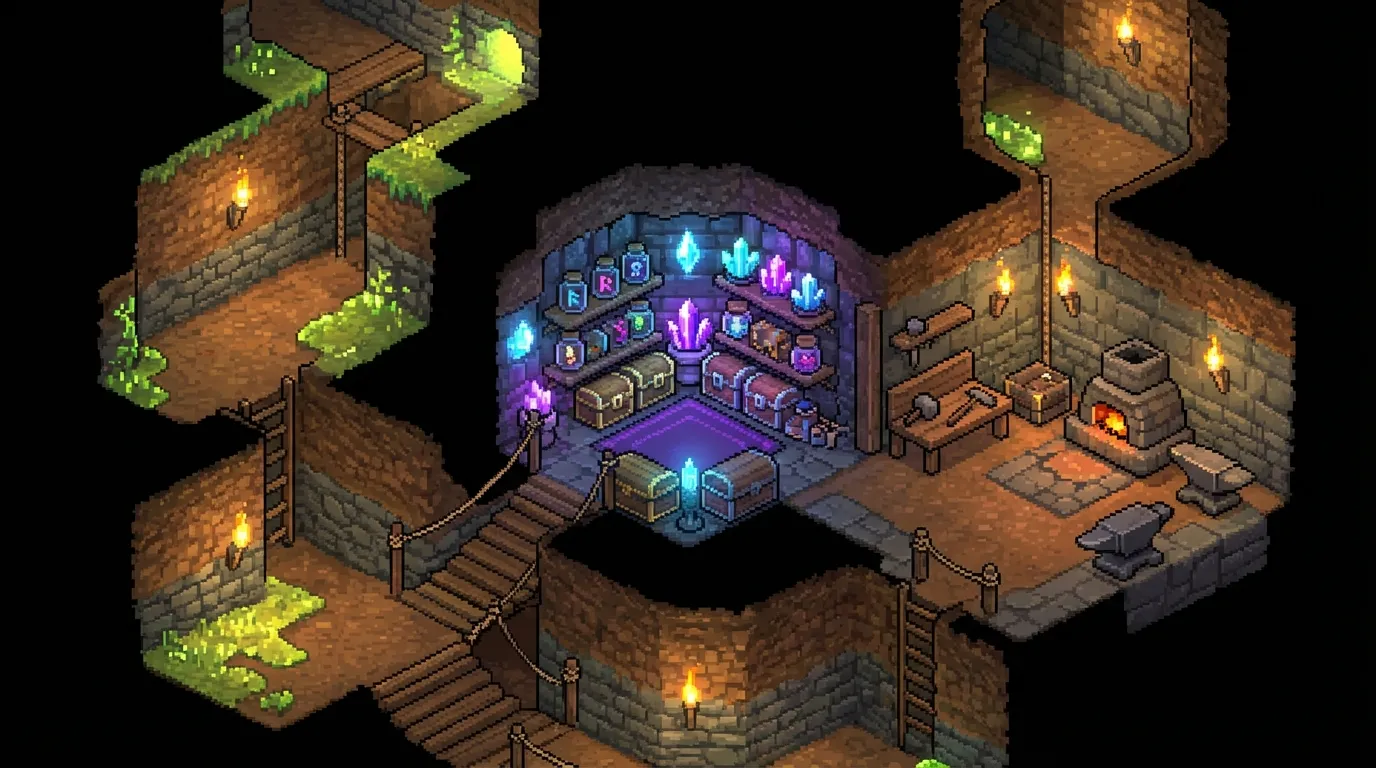
If you like planning efficient systems in other games, like building a custom rig in A Beginner’s Guide to Building Your Gaming PC from Scratch, Magic Storage often scratches that same itch.
Step by Step: Your First Magic Storage Setup
Magic Storage can look intimidating at first, but it’s usually more forgiving than it seems. You can build a small setup, see how it works, and expand later without locking yourself into bad choices, which helps take the pressure off. That’s the mindset I’d recommend here. Early on, the goal is simply to get it running, not to make it perfect.
The most important piece is the Storage Heart, since everything connects back to it. Place it somewhere safe and familiar in your base, often near your main crafting area or spawn where you already walk through a lot. From there, add a few basic Storage Units. Three or four is often enough in the early game, and running out of space just means adding more later. You can attach them directly or use storage connectors to route around walls or floors, but keeping the layout simple makes mistakes easier to see.
You’ll quickly notice that the block you interact with most is the Storage Access, so convenience matters here. Put at least one in an easy-to-reach spot. This is where dumping items becomes painless compared to clicking through chest after chest. Later on, a Crafting Interface can connect to anvils and furnaces, letting recipes pull straight from storage. In my view, that’s when the time savings really start to show, especially during longer crafting sessions.
One useful approach early is keeping everything compact. Connection issues are common at first, often caused by a single misplaced connector or a tiny gap you didn’t notice. Keeping things close together makes fixing problems much easier.
Once it’s all connected, try crafting something basic. Watching materials get pulled automatically really shows how much manual sorting you were doing before.
If you’re more of a visual learner, seeing a full setup can help a lot, especially early on.
After watching a setup video, jump back into your world and copy the basics. Get comfortable by crafting a simple item, then tweak things once it starts to feel natural.
Expanding Storage Without Rebuilding Everything
One of the biggest benefits of Magic Storage, at least from this angle, is how expansion usually feels easy instead of annoying. Traditional chest rooms tend to hit a wall and force a full redesign right when players least want to deal with it. Magic Storage goes a more flexible route, letting existing setups keep working as they grow. That alone saves a lot of frustration over time. Most of the experience stays pleasantly low stress.
So what happens when the system fills up? Adding more Storage Units immediately boosts capacity. There’s no need to move items, rename chests, or manually reorganize anything. The system sorts items on its own and usually stays neat without extra effort, which helps longer play sessions feel smoother and less broken up. It’s simple, and it usually just works.
This flexibility matters even more in modded play. Mods can add hundreds of items very quickly, and rebuilding storage halfway through a run can drain motivation fast. With Magic Storage, adding a new mod doesn’t force everything to stop. The setup adapts as new items appear, so progress keeps moving.
Expansion works both vertically and horizontally, giving builders more options. Storage can sit behind walls, under floors, or far underground. Some players even build separate storage wings that only turn on when needed, which is a practical way to save space.
Many experienced players also split systems by purpose. Crafting materials and potion items might use one network, while boss drops go into another. This isn’t required, but in very large modpacks it often helps with performance.
Before Magic Storage, late-game bases often became cluttered and hard to manage. After switching, players usually notice smoother crafting and less downtime between fights or builds. From this view, it fits the same idea seen in other complex systems, like long-term planning in Terraria Fishing & Seeds: Hidden Mechanics Most Players Overlook. Less friction, more momentum.
Advanced Terraria Storage Ideas for Power Users and Streamers
The biggest upgrade usually shows up once players stop fighting their own storage. Filters make a real difference here. When you sort items by mod or keyword, messy modded worlds get easier to handle, especially after item counts start getting out of hand. Sorting rules help too by auto‑placing new items as they arrive, so things don’t quietly stack up in random chests. The setup feels cleaner, and there’s usually less guessing about where items went.
Linking multiple crafting interfaces is another setup that often pays off. You might place one near an anvil and another by a potion area or a favorite crafting spot. Since every interface connects to the same network, walking back and forth drops off fast. That kind of time savings adds up during longer sessions, when small delays start to feel annoying.
For power users, remote access and modular layouts often become the norm. Access points near farms or arenas turn storage into a shared item hub across the map. Prep before boss fights or big builds usually takes less effort, since gear and materials are already close by.
Streamers tend to notice the benefits quickly. Faster crafting keeps the pace moving, and fewer menu dives help viewers stay focused on the action. Mistakes like crafting duplicates also happen less often.
Accessibility is a quieter plus. Centralized storage lowers the mental effort of remembering chest layouts, which can help players with ADHD or fatigue stay focused. To me, that makes long sessions feel less draining, more like smooth prep before a boss fight instead of scrambling mid‑stream.
Performance, Multiplayer, and Common Myths
One surprise for many players is that layout often matters more than raw size. Magic Storage is known for hurting performance, but in small to medium setups it usually runs with no clear slowdown. Issues tend to appear when very large networks sit inside heavy modpacks, especially if everything is crammed into one small space. That’s when lag can start to show.
Huge, all-in-one networks are usually the main cause. When a system gets too big, breaking it into smaller sections often helps more than changing settings. And if you drop thousands of items in at once, lower-end machines can struggle. Those sudden spikes can lead to short hiccups you’ll notice right away.
In multiplayer, Magic Storage generally works well. Shared access keeps crafting smooth instead of filling chat with constant “who has the bars?” questions, which makes co-op play feel easier.
Server admins often like it too. With the right permissions, it cuts down on duplication issues and limits chest-based griefing, keeping worlds cleaner and more stable overall.
Another common myth is that Magic Storage ruins the survival feel. Most of the time it doesn’t, you still collect everything yourself, just with less chest juggling and more time building or exploring, like quickly grabbing ore to finish a pickaxe upgrade.
Magic Storage Compared to Vanilla Terraria Storage Ideas
Some players really enjoy vanilla Terraria storage ideas, and it’s easy to see why. Color‑coded chests and item frames are popular, and signs often appear once things start to expand, usually after a few long sessions. These setups often feel fun and themed, and sometimes even personal, like you can tell who built them. Magic Storage doesn’t usually remove that creativity. It sits next to it, helping out in a more practical way.
What’s interesting is how players mix the two. Many builders hide Magic Storage behind walls while leaving decorative chests out front as props, so the base still looks busy and lived in. Others combine both systems over time, and that often happens naturally. Early game usually sticks to basic chests. Later on, as builds get bigger and storage gets harder to manage, items slowly move into Magic Storage. Eventually, some players move almost everything into one place, bit by bit.
The real difference often comes down to intent. Vanilla storage focuses on physical layout and visual storytelling, shaping how a base feels as you walk through it. Magic Storage focuses more on function, scale, and speed when dealing with large amounts of items, often in late game. Knowing that usually makes the choice clearer, no matter what stage the world is in.
Here is a simple comparison to help decide.
| Approach | Best For | Downsides |
|---|---|---|
| Vanilla Chests | Early game, roleplay | Slow scaling |
| Hybrid Storage | Builders | Setup time |
| Magic Storage | Late game, mods | Requires mod |
Troubleshooting and Fixing Common Issues
A slow interface is usually the first thing people notice. Cutting back on filters or breaking up a large network often fixes it right away. Most of the time, the simplest fixes work better than you’d expect. When items seem to disappear, they’re often just tossed out by mistake, so it helps to check before assuming something failed. Even reliable systems can mess up now and then, and it’s frustrating but pretty common (we’ve all been there).
If items don’t appear at all, it usually means a unit isn’t connected. A good first step is to check the connectors before looking deeper. Crafting problems often come from missing a link to the correct station, which is easy to overlook during quick rebuilds. That small connection can matter more than it seems.
Storage upgrades also get forgotten a lot (I still forget sometimes). Early tiers fill up fast, making things feel broken when the bar is just full. Backing up your world before big changes is a smart move for modded setups, especially long-term worlds like those mentioned in How to Start a Gaming Podcast: Step-by-Step Guide 2025.
Questions People Often Ask
Yes, it works on servers. With shared access, it usually makes team play smoother and quicker, cuts down mix-ups, and helps groups know who stored what, which improves coordination.
It generally stays solid when you use it the right way (in my view). Long-term saves usually remain safe if you back up the world before adding or updating mods.
The basics are easy, so you feel at ease within an hour, in my view. Advanced tools take longer, but you pick them up as your world grows.
Building a Storage System That Grows With You
Magic Storage is more than just a handy mod. It quietly changes how people play, often in ways they don’t expect at first, and it usually happens over time. Instead of remembering which chest holds what, attention moves to whatever comes next. That might be a boss fight, a base that keeps spreading outward, or trying several mods at the same time. Those small pauses, opening chests, checking signs, running back and forth, start to disappear. The rest of Terraria feels smoother because your focus stays on what you want to do, not on sorting items.
What makes this kind of system appealing is how well it works in long‑term worlds. A storage setup that’s ready for the future cuts down on frustration during long play sessions, and coming back after a break feels easier. Your items are still in one place, using the same interface, so there’s no searching around and very little to relearn. Starting a new character can also move faster, since the system is already flexible and ready to handle more items. New mods usually fit into the same setup, which means less time rebuilding just to stay organized. From my experience, Magic Storage tends to adapt to the world instead of making the world adapt to it.
For players who like planning ahead, especially in modded playthroughs, this style feels natural. It supports late‑game progress without adding stress, and over time it keeps proving useful as the world continues to grow.
Additionally, if you’re interested in exploring other detailed game guides, check out Digimon Story: Time Stranger Guide – Team & Combat Tips and Lost Records Guide: Choices & Consequences Walkthrough for deep strategy insights in different genres.